For digital camera photographers who shoot with manual lenses

Capture the shot.
Let Shot Notes remember the details.

Shot Notes helps you manage image metadata, such as the aperture, focal length, lens, and so on, because a manual lens may tell the camera none of it.

In development. Not yet in the app stores. Watch this space for updates.
Why

The Leica M-mount is a mechanical bayonet mount that has been around since 1954. It does not have any electrical contacts, through which the camera and the lens can communicate. Thus, whether your M-mount lens is a modern or a vintage lens, a Leica or a third-party lens, the camera may not be able to confidently determine the aperture you set, the focal length of the lens, even which lens it was. Hence, your digital image file contains incomplete, or worse, wrong information.

This is not just about Leica and M-mount lenses. It applies to any digital camera with a manual lens that does not have electronic contacts to communicate with the camera.

Shot Notes helps you record the details about your shots and correctly associate them with your digital image files.

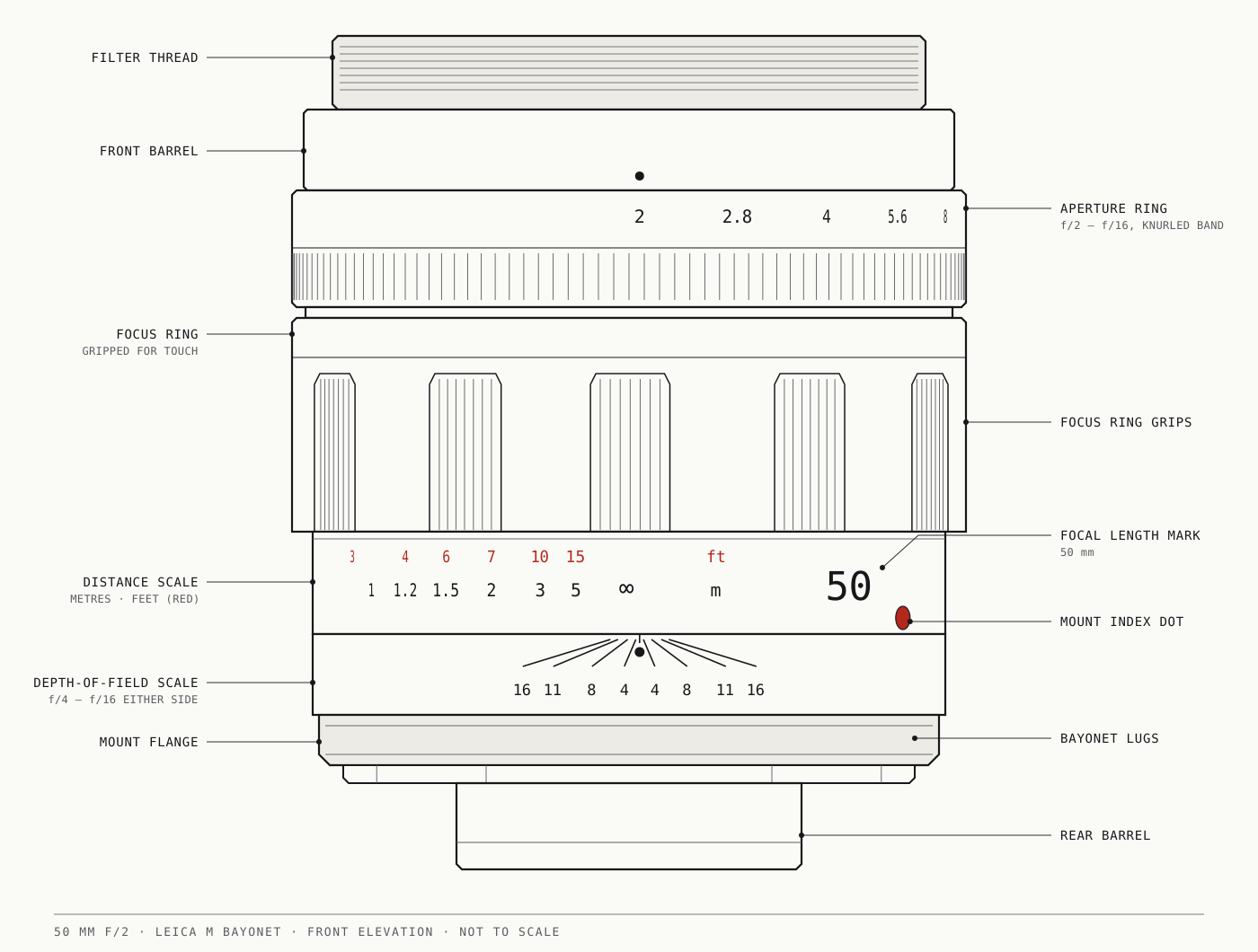
Illustration of a 50 mm f/2 Leica M-mount lens, front elevation.

How

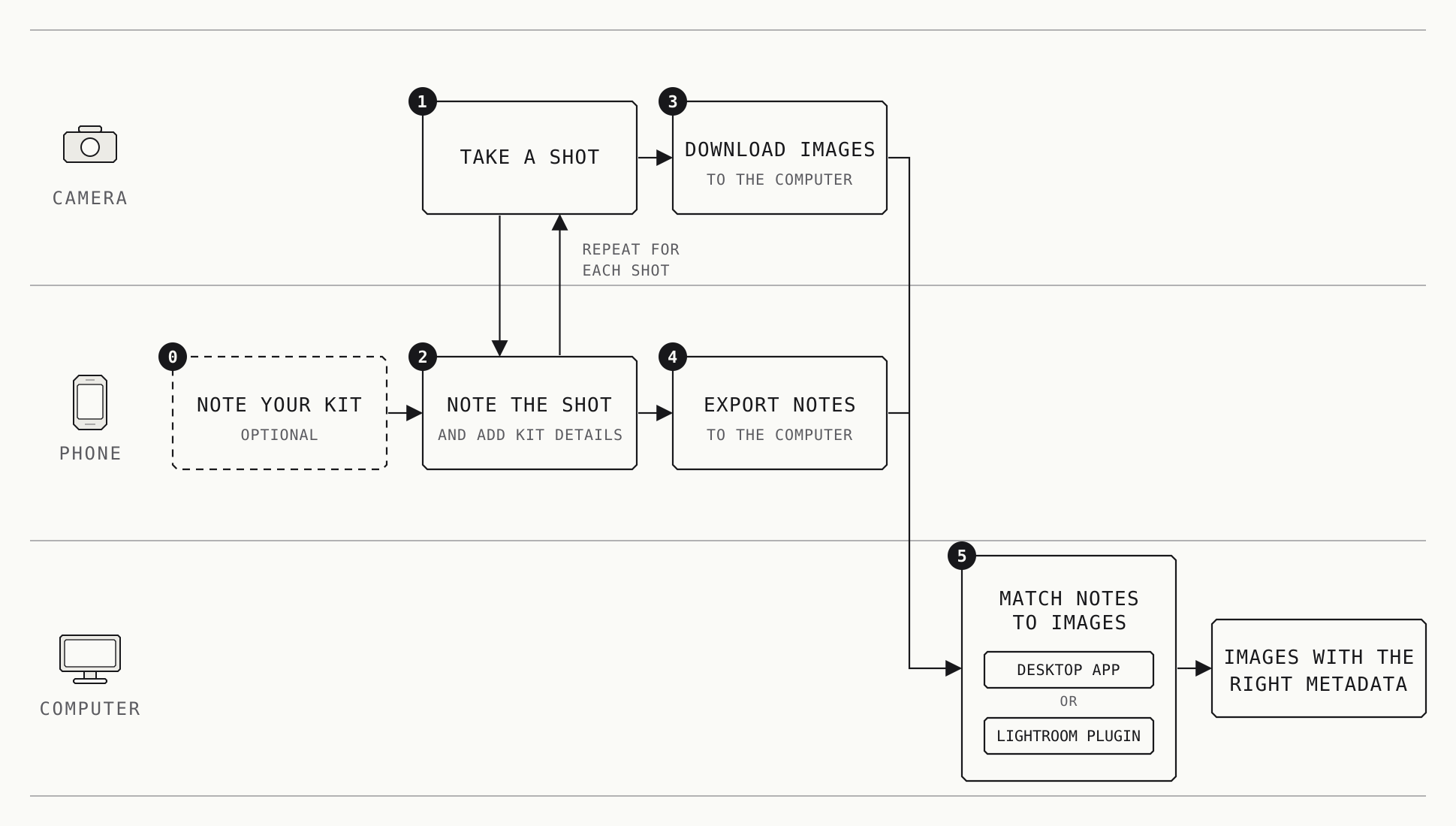
Diagram of the process of capturing metadata.

Here’s your workflow with Shot Notes:

  • On Shot Notes, record metadata, especially aperture, lens, the focal length you used, other accessories, notes, and the time and place for every shot you take on your camera.
  • After you download your images, export your notes to the computer.
  • Using the desktop app or the Lightroom plugin for Shot Notes, match the notes to the images, and voilà, you have the correct metadata for each image!

Shot Notes also lets you search and filter your notes based on various criteria (e.g., date, location, lens), making it easy to find and export the information you need.

Your data

Information about your shots stays on your devices. The phone’s location is read only when you tap the location button, and only to fill in the shot you are logging.

Placeholder for an image to come.

Pricing

Free

£0

Free, always.

Get started
  • Record as many shots as you like
  • Lenses, kit and places
  • Search your shots
  • Export up to 24 shots a month

Plus

£1.25 a month

Billed monthly. Cancel any time.

Coming soon

Everything in Free, plus:

  • Unlimited export, every month
  • Stop whenever you like and go back to Free the next month

Free

£0

Free, always.

Get started
  • Record as many shots as you like
  • Lenses, kit and places
  • Search your shots
  • Export up to 24 shots a month

Plus

£12.50 a year

Two months free. Cancel any time.

Coming soon

Everything in Free, plus:

  • Unlimited export, every month
  • Stop whenever you like and go back to Free when the year ends

Get started

Shot Notes is in development, so these downloads are placeholders for now. Pick your platform to see how to get it.

Version 0.1 (dummy)

Android 10 or later

Coming soon

  1. Open Google Play on your phone.
  2. Search for Shot Notes and tap Install.
  3. Open the app and add your first lens.

Version 0.1 (dummy)

iOS 16 or later

Coming soon

  1. Open the App Store on your iPhone.
  2. Search for Shot Notes and tap Get.
  3. Open the app and add your first lens.

Version 0.1 (dummy)

  • x86-64
  • arm64
  • aarch64

kernel 6.18.x or later

Using Linuxbrew, you can install Shot Notes on Linux with the following commands.

brew tap anirbanbasu/tap
brew trust anirbanbasu/tap
brew install --cask shot-notes

Version 0.1 (dummy)

  • Apple Silicon

macOS 26 or later

Using Homebrew, you can install Shot Notes on macOS with the following commands.

brew tap anirbanbasu/tap
brew trust anirbanbasu/tap
brew install --cask shot-notes

Version 0.1 (dummy)

Windows 10 or later

Download for Windows

64-bit

  1. Run the downloaded installer.
  2. Follow the steps, then open Shot Notes from the Start menu.
  3. Import the notes you exported from your phone.

FAQ

I shoot with a Canon digital SLR or mirrorless camera. Do I need Shot Notes?

Short answer: No. However, there is more nuance to the answer, so read on.

Digital single lens reflex (SLR) and mirrorless cameras from Canon, Nikon, Sony, and other manufacturers have electronic contacts on their lens mounts that allow the cameras and the lens to communicate. The cameras can accurately determine most of the information that Shot Notes would let you record. Your digital image file contains complete and correct information.

However, if you use a manual lens or a manual lens of a different manufacturer through an adapter that does not feature electronic contacts then Shot Notes can help you record the details about your shots and correctly associate them with your images.

Why 'determine most of the information' in the previous answer?

Shot Notes allows you to record information about the accessories that assisted your shot. Some of it could be purely informational, some may be relevant to the final image. For instance, the fact that you used a specific handgrip does not matter to the final image but using a specific neutral density (ND) filter will.

No lens or camera, however sophisticated electronically, can determine the make and model of a filter or some other accessory you used.

I shoot with a film camera. Do I need Shot Notes?

Yes you can use it, but Pellica, for instance, is a better option since Shot Notes is designed for digital cameras and does not record information about film rolls.

Is Shot Notes only useful if I use Leica M digital cameras?

No, Shot Notes can be used with any digital camera with lenses that do not have supported electronic contacts to communicate with the camera.

Shot Notes has been designed with Leica M digital cameras in mind, hence the description is Leica M-mount focussed.

What about the privacy of my information?

Shot Notes keeps your information on your own devices. The phone’s location is read only when you tap the location button, and only to fill in the shot you are logging.

When can I get it?

Shot Notes is in development and not yet in the app stores. Watch this space for updates.
Is Shot Notes free?

Recording (i.e., noting down information about) shots is free, always, and you can record as many as you like. Exporting is free for up to 24 shots a month. There is an optional subscription (see Pricing) that unlocks additional features, including unlimited exports.

What does it mean by 'exporting' shots?

Exporting shots means saving them in a format that can be utilised by the desktop or the command-line application or the Lightroom plugin for Shot Notes to automatically update the metadata of your digital photographs to reflect the information you have recorded.

What counts towards the 24 exports a month?

Each different shot you export counts once, however many times you export it. The month is the calendar month in your device’s time, so it starts again on the 1st.

What happens if I stop subscribing?

You go back to Free the following month. Nothing you have recorded is lost or locked, and you can still export up to 24 shots a month.

Do I need an account?

No. There is nothing to sign up for. A subscription uses the App Store or Google Play account already on your phone.